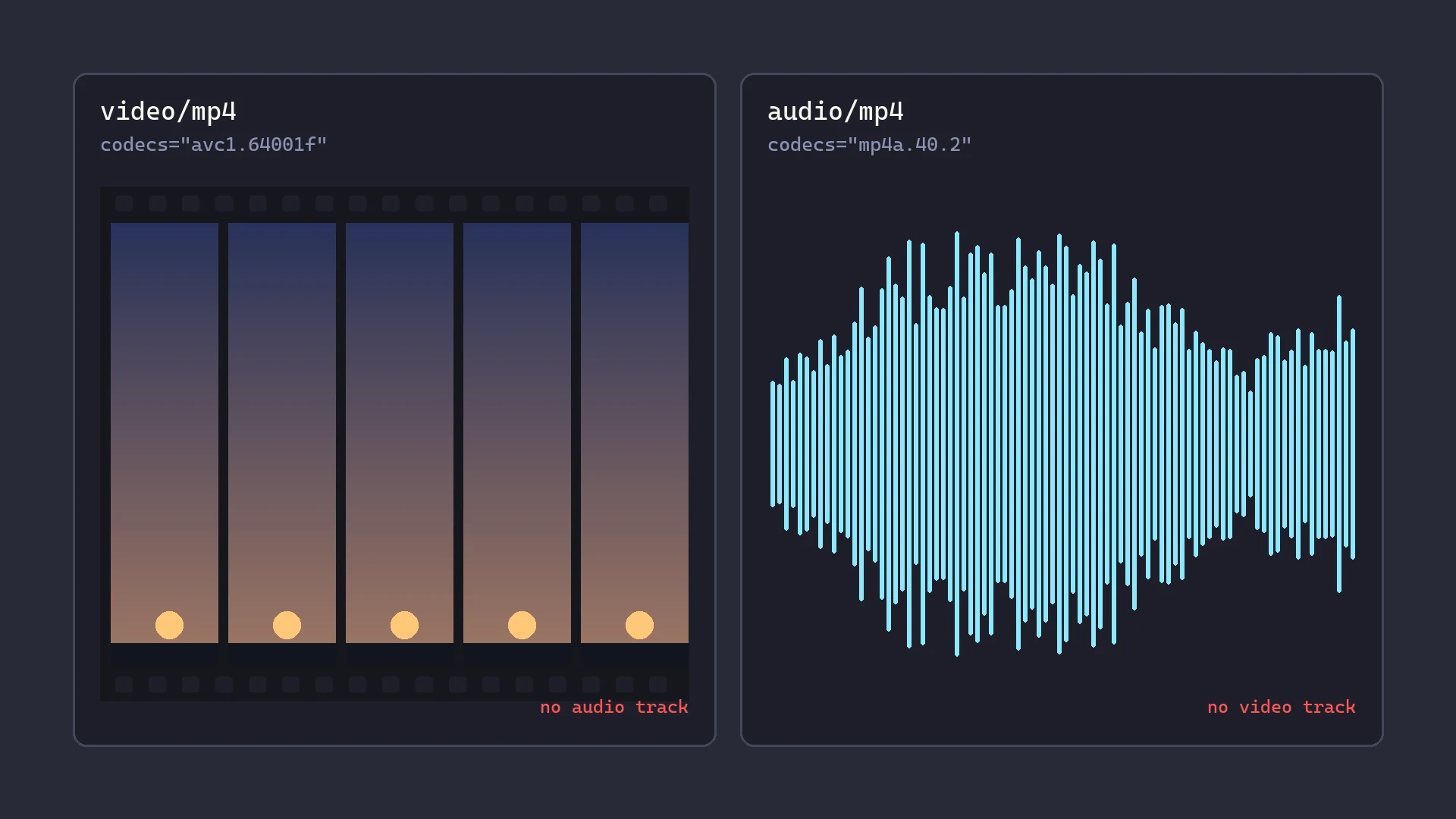
I hooked MediaSource to capture an HLS stream and got two files back. One was a video with no sound. The other was sound with no picture.
I had assumed that capturing playback would hand me the playlist's .ts segments in order, the way saving a progressive MP4 hands you the MP4.
Not one byte of those segments reached my hook.
The playlist describes the server, not what you get
An HLS playlist describes what the server holds. A master playlist lists variants with #EXT-X-STREAM-INF. A media playlist lists segments with #EXTINF, one URI each. Alternate audio comes as #EXT-X-MEDIA with its own URI, encryption as #EXT-X-KEY, and fragmented MP4 packaging as #EXT-X-MAP.
The player makes every one of those decisions for you. By the time bytes reach SourceBuffer.appendBuffer, all of them are made, and the result has been rebuilt into something else.
A capture hook only ever sees the two orange boxes. They are fragmented MP4. The server sends MPEG-TS. Nobody uploaded the thing I saved.
The transmuxer invents a container
Media Source Extensions takes fragmented MP4 everywhere it exists. The spec does define an MPEG-TS format, but no player has ever been able to count on it. So a library that plays .ts segments in a browser converts them first, on the client, in real time.
hls.js keeps that pairing in one table:
const muxConfig: MuxConfig[] = [
  { demux: MP4Demuxer, remux: PassThroughRemuxer },
  { demux: TSDemuxer, remux: MP4Remuxer },
  { demux: AACDemuxer, remux: MP4Remuxer },
  { demux: MP3Demuxer, remux: MP4Remuxer },
];
Second row. MPEG-TS goes through TSDemuxer, which unpacks the transport stream into raw audio and video samples, then through MP4Remuxer, which wraps those samples in fresh moof and mdat boxes.
The samples survive. The container does not. What you capture is a fragmented MP4 that hls.js wrote a few milliseconds earlier, in your tab, and that exists nowhere else.
The first row is the other case. If the playlist has #EXT-X-MAP, the segments are already fMP4: MP4Demuxer reads them and PassThroughRemuxer passes them along mostly intact. That path is close to a copy. The TS path is not.
Two halves, and the playlist does not decide alone
The second surprise was the count. One stream, two files.
MP4Remuxer always emits audio and video as separate tracks, so TS content always gets two SourceBuffers, and you capture two single-track files. Both are valid. Neither is the video: one has no sound, the other has no picture.
The fMP4 path can do better. When an init segment holds both tracks, PassThroughRemuxer keeps them together:
if (audio && video) {
  tracks.audiovideo = {
    container: 'video/mp4',
    codec: audioCodec + ',' + videoCodec,
    // ...
  };
}
One track called audiovideo, one SourceBuffer, one complete file. Capture that and you are done.
This detail cost me an evening. I was sorting buffers by the container in the mime type, and audiovideo arrives as video/mp4. So a finished, playable file with both tracks got filed as video only, and my code sat waiting for an audio half that was never coming. The answer is in the codec list, not the container: codecs="avc1.64001f,mp4a.40.2" means two tracks in one buffer, and the only way to know is to parse the list.
Then a third case. Pick an alternate audio track, one that lives in its own playlist, and the main stream stops supplying audio at all:
// if audio track is expected to come from audio stream controller, discard any coming from main
if (this.altAudio && !this.audioOnly) {
  delete tracks.audio;
  if (tracks.audiovideo) {
    this.logMuxedErr(frag);
  }
}
The main controller throws away whatever audio track the main segments produced, and a separate audio controller loads the alternate track into its own buffer. If the main segments were muxed anyway, hls.js only logs a warning.
Same playlist, same server. Whether you capture one file or two halves depends on how the stream was packaged and on which audio track the viewer picked. The packaging on the server does not decide the shape of what you get. The packaging plus a choice made at runtime does.
Joining the halves is not concatenation. Each has its own moov describing one track, and one file needs a single moov describing both, with the fragments interleaved. The track ids also have to be unique. hls.js numbers TS video 1 and audio 2, but separately packaged renditions often both say 1, and then every tfhd in every fragment needs rewriting. That is a separate post.
#EXT-X-KEY is not the barrier
I expected AES-128 to be the wall. It is not even a speed bump.
hls.js decrypts in its own stage, src/crypt, using WebCrypto when it can and a software AES-128 fallback when it cannot. That stage runs before the demuxer, and the transmuxer's method name tells you where the line sits: transmuxUnencrypted is what runs once there is nothing left to decrypt.
So a hook on appendBuffer gets plaintext. hls.js fetched the key and undid the encryption for you, and #EXT-X-KEY never shows up in the capture, because what it protected has already been unwrapped.
The real wall is somewhere else. Encrypted Media Extensions hands the bytes to a content decryption module, which decrypts inside a black box the page cannot read. Widevine, PlayReady and FairPlay live behind that wall. #EXT-X-KEY:METHOD=AES-128 does not.
Worth saying plainly, because people mix the two up all the time: AES-128 HLS is encrypted in transit, not protected on the client. The browser has to decrypt it in JavaScript to play it, and anything JavaScript can do, a hook in the same page can watch.
What the capture costs you
None of this is free, and the price is not obvious from the outside.
You get whatever bitrate the player chose. Adaptive bitrate picks a variant from the master playlist based on measured bandwidth. Capture playback and you capture that choice, not the best rendition. A downloader reading the playlist directly picks on purpose.
It runs in real time. The player fetches segments as the buffer drains, so you have to play the whole thing. At normal speed, a forty minute video takes forty minutes.
A quality switch breaks the file. Switching levels appends a second init segment to the same buffer, mid-stream. Your capture now holds two moov boxes with different codec settings, and whatever assembles it has to pick one. Lock the quality before you start, or accept a file that breaks where the switch happened.
Which leads somewhere a bit deflating. If you already have the .m3u8 URL, capturing playback is the worst way to get the video. ffmpeg -i playlist.m3u8 -c copy out.mp4 reads the real playlist, picks the highest resolution by default, fetches at network speed instead of playback speed, and remuxes with a muxer that has been doing this for decades.
The capture path is for when there is no URL to have: the page builds a MediaSource, gives the element a blob: URL, and the stream's address never exists as something you can fetch. That is the only case where any of this is the right trade.
What I actually took away
I started with the idea that a player is a pipe. Bytes go in one end, pixels come out the other, and tapping the middle gets you the bytes.
A player is not a pipe. It is a compiler with a network front end. It reads a description of the media, decides what to fetch, decrypts it, parses the transport format, rebuilds the samples into a container the platform accepts, and splits or merges tracks based on choices made at runtime.
Tapping the middle gets you its output. That output is useful, and it is a different file from the one named in the playlist.